gkittelson
MIS
We installed 12.2.1 for our clients a few weeks ago and began seeing reports of calls dropping. But not ALL phones, just some phones some of the time. And it was unpredictable to us from what we saw in system monitor and wireshark.
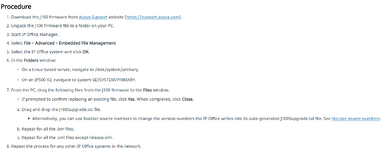
After troubleshooting we determined the issue was the phones were re-registering. We contacted Avaya and they said, oh yeah, we know about this, you need to downgrade your J1xx series phones to 4.1.9 firmware from the 4.1.10 firmware. This is a KNOWN issue for Avaya with J138, J159, J169 and J179 phones.
It's known? I had angry clients and they didn't bother to notify anyone? I also rely on Tek-Tips for indications of issues like these, but I must be the only person brave enough to be running 12.2.1 with the new SIP phones
Just a warning to everyone that if you're on 12.2.1 get off of it, and we'll see if this happens with the 12.3 version. This leaves a very bad taste in my mouth Avaya, why didn't you post a notice about this or release a fix for it? Just unacceptable.
So here is my warning to anyone to never, ever, install 12.2.1 if you have J138, J159, J169 and J179 phones.
After troubleshooting we determined the issue was the phones were re-registering. We contacted Avaya and they said, oh yeah, we know about this, you need to downgrade your J1xx series phones to 4.1.9 firmware from the 4.1.10 firmware. This is a KNOWN issue for Avaya with J138, J159, J169 and J179 phones.
It's known? I had angry clients and they didn't bother to notify anyone? I also rely on Tek-Tips for indications of issues like these, but I must be the only person brave enough to be running 12.2.1 with the new SIP phones
Just a warning to everyone that if you're on 12.2.1 get off of it, and we'll see if this happens with the 12.3 version. This leaves a very bad taste in my mouth Avaya, why didn't you post a notice about this or release a fix for it? Just unacceptable.
So here is my warning to anyone to never, ever, install 12.2.1 if you have J138, J159, J169 and J179 phones.